
PHP2Shell
Two use-after-free bugs in PHP's request lifecycle that let an unauthenticated attacker run code on the server before your application ever sees the request.
Understanding the Threat
Disclosed: October 21, 2026 (coordinated release; details leaked a day early)
Researchers: Calif, Wiz and OpenAI
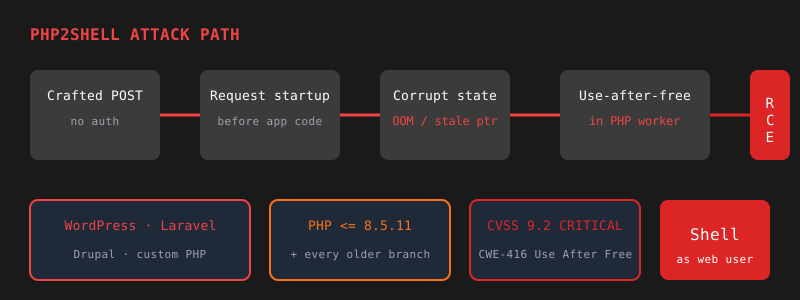
PHP2Shell is the name for two critical vulnerabilities in the PHP interpreter itself, not in any framework or plugin. Both bugs fire while PHP is still setting up the incoming request, so an attacker needs no login, no vulnerable plugin, and no specific application code. If a server runs an unpatched PHP and accepts HTTP requests, it is a target.
That makes the blast radius unusually wide. WordPress, Drupal, Laravel, Magento and hand-written PHP apps are all exposed to the same degree, because the request is compromised before any of them run. PHP's own advisory confirms full remote code execution against Apache with mod_php using default memory and input limits.
This is being exploited now. AWS reported exploitation attempts against its honeypots as early as October 17, four days before the patch shipped. Cloudflare and watchTowr reported attacks on disclosure day.
🚨 Why This Matters
- Pre-auth, pre-application — The attack completes before your code runs
- Framework-agnostic — Every PHP app on the server is equally exposed
- Default configuration — Session upload progress is on by default; no
session_start()needed - Exploited in the wild — Attacks seen from October 17, before the fix existed
- Leaked before the patch — Details circulated a day ahead of the coordinated release
Am I Vulnerable?
If any web-facing PHP runtime is older than 8.5.12, 8.4.27, 8.3.36 or 8.2.35, assume yes. PHP lists every web SAPI as at risk: PHP-FPM, Apache mod_php, php-cgi, FrankenPHP and LiteSpeed. Apache with mod_php is the highest risk because a full exploit has been demonstrated there. Check the runtime that actually serves requests:
# PHP-FPM (Debian/Ubuntu: adjust to your installed version)
php-fpm8.3 -v
# PHP-FPM (RHEL/Alma/Rocky)
php-fpm -v
# Is mod_php loaded into Apache?
apache2ctl -M 2>/dev/null | grep -i php || httpd -M 2>/dev/null | grep -i php

# Inside a container
docker exec <container> php -vphp -v Is Not Your Web ServerThe command-line PHP can be a different version or build from the one serving your site. Check the FPM binary or Apache module directly, and don't forget containers, control panels and apps that bundle their own interpreter. A clean CLI result proves nothing about the web runtime.
Affected Versions
Both CVEs share the same fixed releases. Branches older than 8.2 are end-of-life and get no official release.
| Branch | Affected Versions | Fixed In |
|---|---|---|
| PHP 8.5 | < 8.5.12 | 8.5.12 |
| PHP 8.4 | < 8.4.27 | 8.4.27 |
| PHP 8.3 | < 8.3.36 | 8.3.36 |
| PHP 8.2 | < 8.2.35 | 8.2.35 (EOL Dec 31, 2026) |
| PHP 7.4, 8.0, 8.1 | All | No release; source backports only |
| PHP 7.3 and older | Treat as affected | No fix; upgrade PHP |
Distribution packages often backport the fix without changing the upstream version number. If your version looks old, check the package changelog for the CVE before assuming you're exposed:
# Debian/Ubuntu (adjust the package name)
apt changelog php8.3-fpm 2>/dev/null | grep -m1 -E 'CVE-2026-10961[89]'
# RHEL/Alma/Rocky
rpm -q --changelog php-fpm | grep -m1 -E 'CVE-2026-10961[89]'
Technical Details
The two bugs are independent, but both corrupt memory during request startup:
- CVE-2026-109618, OOM corruption — An out-of-memory error during request setup leaves data half-built, and shutdown still trusts it.
- CVE-2026-109619, stale request state — Pointers from a finished request outlive the memory they point to, and the next request on the same worker uses them.
PHP aborts with longjmp() when it hits memory_limit. If that happens while it is still parsing the request into internal structures, the request shutdown code walks the partially initialized data as if it were valid. Datadog's reproduction shows one path: a hash table's element count is incremented before the key is allocated, so an OOM at that exact moment leaves a "live" slot with no key or value. The attacker steers the OOM with an oversized POST body (crafted multipart parts or a multi-megabyte field name) and turns the bogus slot into code execution.
Some request-owned global state (error, session, backtrace and extension pointers) is not cleared when the request's memory is freed. A follow-up request landing on the same worker reads that dangling state before normal initialization resets it: a classic use-after-free. PHP confirmed two triggers: session upload progress (on by default; works on mod_php and PHP-FPM) and, on PHP 8.5 only, fatal_error_backtraces (confirmed on mod_php). More workers lower the odds per attempt but do not prevent the attack.
- Apache +
mod_php— Highest risk; full pre-auth RCE demonstrated with default limits - PHP-FPM behind Nginx, Caddy or Apache — CVE-2026-109619 confirmed; CVE-2026-109618 susceptible by source analysis
php-cgi, FrankenPHP, LiteSpeed — Listed as at risk in PHP's advisory- Shared and managed hosting — You can't patch it yourself; confirm with your provider
PHP's security team found no working exploit among the code that circulated after the leak, though several security vendors have since built working exploits privately. Fake PoCs are already on GitHub, and Tenable warns that some circulating code may carry malware. Don't run any of it on a machine you care about.
How to Fix
1Upgrade PHP and Restart Every Worker
Upgrading is the only complete fix. Linux distributions received the patches in advance, so most package managers already have them. Running workers keep the old code in memory, so restart PHP-FPM or Apache afterwards.
sudo apt update && sudo apt upgrade
sudo systemctl restart php8.3-fpm # or: apache2, if you use mod_phpsudo dnf update 'php*'
sudo systemctl restart php-fpm # and httpd, if you use mod_php# Rebuild on a fresh base image, then redeploy
docker build --pull -t your-app .Using the Remi repository? Remi announced it would not have updates on release day. Check for the update before assuming you're patched, or switch to your distribution's packages.
2Can't Patch Today? Harden php.ini
These settings come from PHP's advisory. They cut off the known attack paths but do not make an unpatched server safe. Set them in php.ini, the FPM pool, or Apache config, not with ini_set() or .user.ini, which apply too late. Then restart every worker.
; CVE-2026-109619: removes the default-on trigger
session.upload_progress.enabled = 0

; CVE-2026-109619: PHP 8.5 only
fatal_error_backtraces = 0

; CVE-2026-109618: shrink the room to steer an OOM
post_max_size = 8M          ; use 32M if you accept file uploads
upload_max_filesize = 6M    ; keep below post_max_size
What breaks? Upload progress bars that rely on session.upload_progress stop updating, and uploads larger than the new limit are rejected. Hiding errors with display_errors or @ does not help.
3Limit Request Bodies at the Edge
Cap request size in front of PHP so oversized bodies never reach it, including chunked requests without a Content-Length. If your app never accepts multipart/form-data, block it outright. Cloudflare and Palo Alto have shipped WAF rules, but Cloudflare calls its rules a stopgap only.
server {
  client_max_body_size 8m;   # match post_max_size
}# 8 MB, to match post_max_size
LimitRequestBody 8388608Critical: Know Who Patches Your PHP
On a VPS or cloud VM (DigitalOcean Droplets, EC2, Lightsail and similar), PHP is yours to patch. Your provider will not do it for you. On shared hosting, managed WordPress or a PaaS, confirm with your provider that the runtime serving your site is on a fixed version.
Check for Signs of Exploitation
Attacks predate the patch, so a server that was exposed between October 17 and your upgrade deserves a look. Datadog lists these signals: a memory-exhaustion error reported at Unknown on line 0 (meaning no script was running), worker segfaults, and a web server process spawning a shell.
# Memory exhaustion before any script ran
sudo grep "Allowed memory size" /var/log/apache2/error.log | grep "Unknown on line 0"
sudo grep "Allowed memory size" /var/log/nginx/error.log | grep "Unknown on line 0"

# Apache worker crashes
sudo grep "exit signal Segmentation fault" /var/log/apache2/error.log

# Shells running as the web server user (apache on RHEL)
ps -u www-data -o pid,ppid,lstart,cmd | grep -E '(^|/| )(sh|bash|dash)( |$)'
No hits is not proof of safety. A successful exploit may not crash the worker or log anything. If you find matches, treat the host as compromised: rotate credentials and rebuild from a known-good image.